A well-organized project plan helps turn an idea into a series of manageable actions. It explains what a project needs to achieve, which tasks must be completed, who is responsible, what resources are required, and when each stage should happen. With a clear plan, teams can coordinate their work, monitor progress, and address potential problems before they become major setbacks.
Whether you are managing a business initiative, launching a new product, organizing an event, or coordinating a team assignment, a practical project plan provides a shared roadmap. It helps stakeholders understand expectations and gives project managers a reliable way to track deadlines, costs, deliverables, and risks.
This guide explains what a project plan is, what to include, and how to create one step by step. You will also learn how to use a project plan template to organize tasks, allocate resources, and keep your project on track.
What Is a Project Plan?
A project plan is a document that describes how a project will be executed, monitored, and completed. It translates project objectives into defined tasks, schedules, responsibilities, resource requirements, and performance expectations.
A project plan may be a simple checklist and timeline for a small project or a detailed document supported by schedules, budgets, risk registers, and communication procedures for a larger initiative.
Most project plans help answer these essential questions:
- What does the project need to accomplish?
- Why is the project important?
- Who will complete the work and make decisions?
- When should each task and milestone be completed?
- Which resources are needed to deliver the expected results?
- How will progress, quality, costs, and risks be managed?
By documenting these details, the project team gains a common understanding of the work and how success will be measured.
Why Is a Project Plan Important?
A project plan is more than a list of tasks. It creates a structure for making decisions, coordinating people, and responding to changes throughout the project lifecycle.
It Clarifies Project Goals
Clearly defined objectives help the team understand the intended outcome. They also make it easier to determine whether a proposed task contributes to the project’s purpose or falls outside the agreed scope.
It Keeps Work Organized
Breaking a large initiative into smaller tasks makes the workload easier to understand and manage. Team members can see their responsibilities, dependencies, and deadlines instead of relying on informal instructions.
It Supports Time and Budget Control
A schedule helps identify important deadlines and activities that could delay delivery. A budget estimate provides a baseline for comparing planned costs with actual spending and identifying financial issues early.
It Improves Communication
A shared plan gives team members, clients, managers, and other stakeholders a consistent reference point. Regular updates help everyone understand what has been completed, what comes next, and which decisions require attention.
It Helps Manage Risks
Planning encourages the team to consider potential obstacles before work begins. Identifying risks early allows the project manager to prepare preventive actions, assign owners, and establish contingency measures.
What to Include in a Project Plan
The contents of a project plan depend on its size, complexity, and purpose. However, the following sections provide a useful foundation for most projects.
1. Project Overview and Background
Start with the project name, project manager, sponsor, start date, target completion date, and a short description of the initiative. Explain the business need or problem the project is intended to address.
This overview helps readers understand the context before reviewing the detailed schedule and resources.
2. Project Objectives and Success Criteria
Define the outcomes the project is expected to deliver. Whenever possible, make objectives specific, measurable, achievable, relevant, and time-bound.
For example, rather than stating that the team will improve a website, define a measurable target such as launching a redesigned website by an agreed date or reducing a specific page’s loading time to a defined threshold.
Success criteria should explain how the team will determine whether the project has achieved its intended results.
3. Project Scope and Deliverables
The project scope defines the work included in the initiative and the boundaries of the team’s responsibilities. List the major deliverables and explain what is excluded when exclusions are relevant.
A clear scope helps prevent uncontrolled expansion, often called scope creep. It also provides a basis for evaluating change requests when new requirements emerge.
4. Tasks and Responsibilities
Break the project into smaller activities that can be assigned, scheduled, and tracked. Each task should have a clear description, an owner, an expected completion date, and a defined outcome.
For collaborative projects, consider using a responsibility matrix to clarify who performs the work, approves decisions, provides input, and receives updates.
5. Project Timeline and Milestones
Organize tasks in a logical sequence and estimate how long each activity will take. Identify dependencies, such as approvals or materials that must be available before another task can begin.
Include key milestones such as project kickoff, design approval, development completion, testing, launch, and final handover. A Gantt chart can help visualize tasks, durations, overlapping activities, and the overall project timeline.
6. Resources and Budget
Identify the people, equipment, materials, software, facilities, and funding required to complete the work. Estimate costs for relevant categories, including labor, supplies, services, training, and other project expenses.
Record the assumptions behind the estimates and include an appropriate contingency allowance when necessary. The project manager should compare actual spending with the approved budget throughout execution.
7. Stakeholders and Communication
List the people or groups who influence the project or are affected by its results. Clarify their roles, approval responsibilities, and information needs.
A communication plan can specify what updates will be shared, who will receive them, how often they will be sent, and which channels the team will use. For example, a project may require weekly progress reports and monthly stakeholder reviews.
8. Risk Management and Quality Standards
Identify possible risks, estimate their likelihood and impact, and define actions to reduce or respond to them. Common risks include delays, budget overruns, limited resources, technical problems, supplier issues, and changing requirements.
Also define quality expectations, review procedures, testing requirements, and acceptance criteria. These standards help the team verify that deliverables meet the agreed requirements.
Sample Project Plan Template
A project plan template provides a consistent structure for organizing the information needed to execute a project. The sample below illustrates how objectives, tasks, timing, budget, and risks can fit into one planning document.
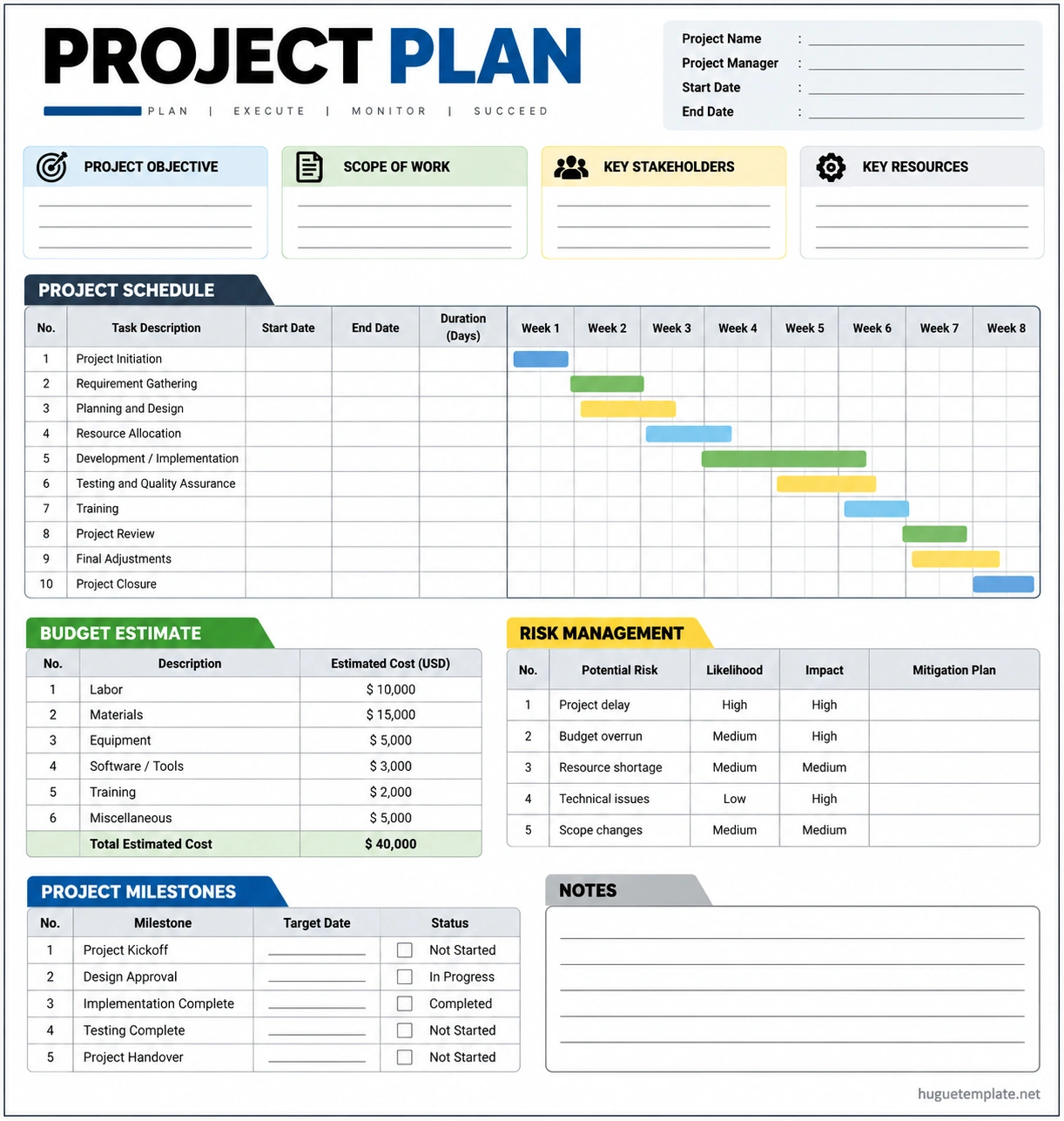
For example, a team preparing to launch a new company website could organize its project plan as follows:
- Objective: Launch a redesigned company website that meets agreed business and user requirements.
- Scope: Website design, content preparation, development, testing, and launch.
- Tasks: Gather requirements, approve designs, develop pages, review content, test functionality, and publish the website.
- Timeline: Assign start dates, end dates, task durations, and milestone deadlines.
- Resources: Allocate designers, developers, content writers, testing tools, and the approved budget.
- Risks: Track delayed approvals, technical issues, and missing content, along with planned responses.
- Success criteria: Confirm that the website meets agreed requirements and passes the necessary launch checks.
This example is illustrative. Actual tasks, dates, costs, and responsibilities should reflect the project’s needs and available resources.
How to Create a Project Plan Step by Step
Step 1: Define the Project Purpose
Start by explaining why the project is needed and what outcome it should deliver. Confirm the business goals, stakeholders’ expectations, and criteria that will determine success.
Step 2: Establish the Scope
Document the deliverables, major activities, limitations, and exclusions. Discuss the scope with relevant stakeholders to reduce misunderstandings before assigning work.
Step 3: Break the Work Into Tasks
Divide each major deliverable into smaller activities. Estimate the effort required and identify which tasks depend on other activities, decisions, or resources.
Step 4: Build the Schedule
Assign task owners, start dates, due dates, and durations. Add milestones and account for dependencies, holidays, approval periods, and other scheduling constraints.
Step 5: Allocate Resources and Estimate Costs
Determine which people, tools, materials, and services are required. Estimate the expected cost of each major category and compare the total with the available budget. Resolve resource conflicts before committing to deadlines.
Step 6: Identify Risks and Set Quality Standards
List the most important risks, assign someone to monitor each one, and define practical mitigation actions. Establish review checkpoints and acceptance criteria so deliverables can be evaluated consistently.
Step 7: Review and Approve the Plan
Share the draft with the project sponsor, team leads, and other relevant stakeholders. Confirm that the scope, schedule, budget, responsibilities, and assumptions are realistic. Record approval and document any important conditions.
Step 8: Monitor Progress and Update the Plan
Use regular check-ins and progress reports to compare actual performance with the plan. Update task status, forecasts, risks, and resource assignments as conditions change. Communicate significant changes and follow the agreed approval process when scope, budget, or deadlines need to be revised.
Best Practices for an Effective Project Plan
- Keep it practical. Include enough detail to guide execution without creating unnecessary administrative work.
- Assign clear ownership. Every important task should have a person responsible for moving it forward.
- Use realistic estimates. Base schedules and budgets on available evidence, team capacity, and known constraints.
- Track measurable progress. Use milestones and deliverables rather than relying only on general status descriptions.
- Communicate changes early. Inform affected stakeholders when a risk or delay could influence the project outcome.
- Review risks regularly. New risks can emerge as the project progresses, so risk management should continue after planning.
- Maintain one reliable version. Keep the latest approved plan accessible to the people who need it.
- Learn from completed projects. Use lessons learned to improve future estimates, processes, and planning decisions.
Common Project Planning Mistakes to Avoid
Several planning mistakes can make even a well-intentioned project difficult to manage. Avoid these common problems:
- Setting vague objectives that cannot be measured
- Defining a scope that leaves important deliverables unclear
- Creating deadlines without checking task dependencies
- Underestimating costs or overlooking resource requirements
- Failing to assign clear responsibility for tasks
- Ignoring risks until they affect delivery
- Sharing inconsistent information across different versions of the plan
- Leaving the plan unchanged when important assumptions no longer apply
A good project plan is detailed enough to support decisions but flexible enough to respond to new information. It should guide the team rather than become a document that nobody uses.
Frequently Asked Questions
What is the main purpose of a project plan?
The main purpose of a project plan is to provide a roadmap for completing a project. It defines the objectives, scope, tasks, schedule, resources, budget, responsibilities, and methods for managing risks and measuring progress.
What are the five main parts of a project plan?
Five common core elements are project objectives, scope and deliverables, tasks and responsibilities, schedule and milestones, and resources and budget. Larger projects should also document stakeholder communication, risks, quality standards, and change management.
What is the difference between a project plan and a project schedule?
A project schedule focuses on the timing, duration, sequence, and dependencies of activities. A project plan is broader and includes the schedule alongside objectives, scope, responsibilities, resources, budget, risks, and other execution details.
Can I use a project plan template for different projects?
Yes. A reusable project plan template can save time and make planning more consistent. Customize its objectives, deliverables, tasks, schedule, resources, budget, and risks for each new project instead of copying details from an unrelated initiative.
How often should a project plan be updated?
Update the plan whenever meaningful changes affect the scope, schedule, budget, resources, risks, or responsibilities. Many teams review progress weekly, while complex projects may require more frequent updates. The right frequency depends on the project’s pace and level of risk.
Who is responsible for creating a project plan?
The project manager commonly coordinates the planning process, but the plan should involve the people responsible for delivering the work. Sponsors, team leads, subject matter experts, finance staff, and other stakeholders may contribute information or approve specific parts.
What makes a project plan successful?
An effective project plan has clear objectives, a well-defined scope, realistic estimates, assigned responsibilities, measurable milestones, and practical risk controls. Regular communication and consistent progress reviews help keep the plan useful during execution.
Conclusion
A clear project plan helps teams understand what needs to be delivered, how the work will be completed, and which resources are required. By defining the scope, setting realistic deadlines, assigning responsibilities, estimating costs, and planning for risks, you create a stronger foundation for successful project execution.
Use a project plan template to organize the essential details, review it with stakeholders, and update it as the project evolves. Most importantly, treat the plan as a working guide that supports communication, informed decisions, and continuous progress from kickoff through completion.
Download: Project Plan Template
