A packing slip is a shipping document that lists the items included in a package. It helps sellers verify that an order has been packed correctly and allows customers to check whether all expected products have arrived. By providing a clear list of shipped items, a packing slip supports order accuracy, inventory management, and a smoother delivery experience.
Whether you operate an online store, manage a warehouse, sell products wholesale, or ship orders from home, a packing slip can make your fulfillment process more organized. It provides a simple checklist for the packing team and a useful reference for customers who need to inspect their deliveries.
In this guide, you will learn what a packing slip is, what information it should contain, how it differs from an invoice, and how to create a professional packing slip template for your business.
What Is a Packing Slip?
A packing slip is a document included with a shipment that identifies the products packed in an order. It typically lists item descriptions, product codes, quantities, and order details so the recipient can compare the contents of the package with the original order.
For example, an online store shipping two notebooks, one planner, and three pens can include a packing slip showing each product and its quantity. The warehouse employee can use the document as a final checklist, while the customer can use it to confirm that the correct items arrived.
A packing slip usually does not include product prices, payment details, or the amount owed. Its primary purpose is to verify shipment contents rather than request payment.
What Should a Packing Slip Include?
A useful packing slip contains enough information to identify the order and verify its contents. The exact layout depends on the products you sell, your fulfillment process, and your shipping requirements.
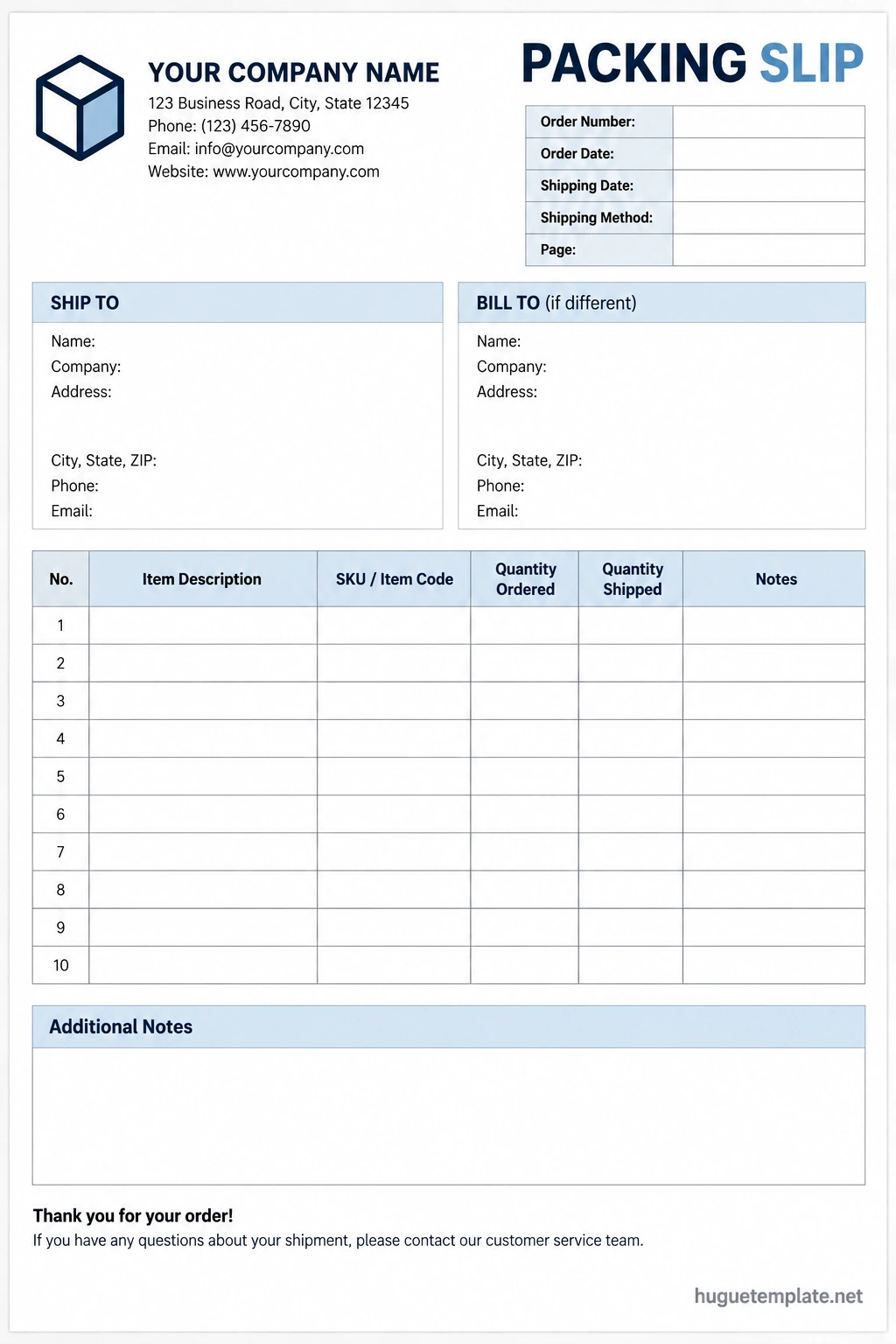
1. Seller Information
The top section should identify the business responsible for shipping the order. Depending on your business, include:
- Business or store name
- Business address
- Customer service email address
- Phone number, if appropriate
- Return instructions or a link to the return policy
Clear seller information helps customers identify the sender and contact the business if a product is missing, damaged, or incorrect.
2. Recipient and Shipping Information
Include the recipient’s name and relevant shipping details. A packing slip may show the shipping address or a shortened version, depending on the fulfillment process and privacy considerations.
For shipments sent directly to customers, accurate recipient information helps distinguish orders and reduces confusion when multiple packages are being prepared.
3. Order Number and Shipping Date
An order number provides a reference that connects the packing slip to the seller’s order management system. Include the order date or shipping date when useful for tracking and customer service.
Using a consistent order reference makes it easier to investigate missing products, handle returns, and reconcile warehouse records.
4. Item Descriptions and Product Codes
List each product using a clear description. If your business uses stock keeping units (SKUs), product codes, or variations such as size and color, include the relevant details.
For example, instead of listing an item simply as “shirt,” identify it as “Cotton T-Shirt, Blue, Size Medium.” Specific descriptions help employees and customers distinguish between similar products.
5. Quantities Ordered and Shipped
The quantity field is one of the most important parts of a packing slip. It allows the packing team to compare the order with the items placed in the package.
For businesses that ship orders in multiple packages, separate fields for quantities ordered and quantities shipped can help identify backordered or partially fulfilled items.
6. Notes and Special Instructions
A notes section can communicate relevant information about the shipment. It may identify items shipped separately, backordered products, special handling instructions, or customer service information.
Keep notes concise and accurate. Avoid including payment information or unnecessary personal data that does not help with shipment verification.
Packing Slip Example
The following example shows how a simple packing slip might be organized for an online retail order.
Seller: Bright Paper Supplies
Order Number: ORD-10482
Shipping Date: October 15, 2026
Recipient: Jordan Taylor
- Item 1: Daily Planner, SKU PL-101, Quantity Ordered: 1, Quantity Shipped: 1
- Item 2: Ruled Notebook, SKU NB-205, Quantity Ordered: 2, Quantity Shipped: 2
- Item 3: Ballpoint Pen Set, SKU PN-310, Quantity Ordered: 1, Quantity Shipped: 1
Shipment Status: All listed items shipped.
Notes: Please contact customer service if any item is missing or damaged.
This example illustrates the information a packing slip can contain. In a real shipment, use the actual order details and ensure that the listed quantities match the products packed in the package.
Packing Slip vs. Invoice: What Is the Difference?
A packing slip and an invoice may relate to the same order, but they serve different purposes. Understanding the difference helps businesses prepare the right documents for shipping and billing.
Packing Slip
A packing slip focuses on the physical contents of a shipment. It lists the items and quantities included in the package so the seller and recipient can verify order accuracy.
Because its purpose is shipment verification, a packing slip generally excludes prices, payment terms, and the amount due.
Invoice
An invoice is a billing document that records the amount a customer owes or the charges associated with a transaction. It may include product descriptions, quantities, unit prices, taxes, discounts, payment terms, and the total due.
An invoice requests or documents payment, while a packing slip helps verify the contents of a shipment. Some businesses use both documents for the same order.
How to Create a Packing Slip
You can create a packing slip using a printable template, spreadsheet, word processor, ecommerce platform, or inventory management system. Choose a method that fits your order volume and fulfillment process.
Step 1: Choose a Packing Slip Template
Start with a layout that includes seller information, recipient details, an order reference, and a table for product descriptions and quantities.
A reusable packing slip template can save time and keep shipment documentation consistent across orders.
Step 2: Add Order Information
Enter the order number, shipping date, recipient details, and any relevant fulfillment references. Confirm that the information matches the order in your system.
Step 3: List the Products
Record every product included in the shipment. Add the appropriate SKU, product variation, and quantity so the packing team can identify each item accurately.
If the order is being shipped in multiple packages, indicate which items are included in the current shipment. Do not list unshipped products as though they were already packed.
Step 4: Verify the Package Contents
Use the packing slip as a checklist while preparing the order. Match each listed product to the physical item and confirm its quantity before sealing the package.
If an item is missing, damaged, or unavailable, follow your business’s fulfillment procedures and update the shipment documentation when appropriate.
Step 5: Print and Include the Packing Slip
Print the completed packing slip and include it inside the package where the customer can find it easily. Make sure the text is legible and the order details are correct.
Some businesses use digital packing documents or shipping labels with order summaries. Choose a method that suits your customers, packaging process, and operational requirements.
Benefits of Using a Packing Slip Template
A standardized packing slip can improve order fulfillment and make routine shipping tasks easier to manage.
- Fewer packing errors: Employees can compare the order with the items being packed.
- Better inventory control: Shipment records help identify quantities that have been dispatched.
- Easier order verification: Customers can check the contents against the packing list.
- Smoother returns: Product descriptions and order references help customer service identify the original shipment.
- Consistent documentation: A standard format makes it easier to train employees and review fulfillment procedures.
- Improved customer experience: Clear documentation helps customers understand what they received.
Best Practices for Packing Slips
To make your packing slips more useful, keep the document simple, accurate, and consistent with your shipping process.
- Use clear product descriptions: Include sizes, colors, model numbers, or other details needed to identify an item.
- Verify quantities: Check each product before sealing the package.
- Use unique order references: Make it easy to connect the packing slip to the correct order.
- Keep the layout readable: Use clear headings, adequate spacing, and legible fonts.
- Separate shipping and billing information: Keep the packing slip focused on the shipment rather than payment collection.
- Document partial shipments: Identify which items are included in each package when an order ships in multiple parts.
- Protect customer information: Include only the information needed to fulfill and identify the shipment.
- Review the process regularly: Update the template when product categories, fulfillment procedures, or business requirements change.
Frequently Asked Questions About Packing Slips
What is the main purpose of a packing slip?
The main purpose of a packing slip is to list the products included in a shipment. It helps the seller verify the order before dispatch and allows the customer to check that the expected items arrived.
Does a packing slip include prices?
A standard packing slip generally does not include prices, taxes, or payment details. Its purpose is to document shipment contents rather than request payment. Businesses may customize their documents, but billing information is usually handled separately.
Is a packing slip the same as a shipping label?
No. A shipping label provides delivery information used by the carrier, such as the recipient’s address and tracking barcode. A packing slip lists the items included in the package. Both documents may be used for the same shipment.
Do all packages need a packing slip?
Not every shipment requires a printed packing slip. Requirements depend on the business, shipping arrangement, industry, and customer expectations. Many businesses use one because it makes order verification and customer service easier.
Can I create a packing slip in Excel?
Yes. Excel or another spreadsheet application can be used to create a packing slip with fields for order details, item descriptions, SKUs, and quantities. You can save a reusable template and update it for each shipment.
Should a packing slip show items that are backordered?
It can identify backordered items when doing so helps explain why the shipment contains fewer products than the original order. Clearly distinguish items included in the current package from items that will be shipped separately.
Where should I put the packing slip?
Most businesses place the packing slip inside the package where the recipient can find it easily. If the package requires special handling or the document must remain accessible, follow the relevant packaging and shipping procedures.
Can a packing slip be used for returns?
Yes. A packing slip can help customers and customer service teams identify the original order and the products shipped. However, a packing slip does not automatically authorize a return; customers should follow the seller’s return policy.
Conclusion
A packing slip is a practical shipping document that helps sellers and customers verify the contents of a package. By listing product descriptions, order references, and quantities, it supports accurate fulfillment, better inventory records, and easier order verification.
Whether you use a printable packing slip template, spreadsheet, or ecommerce software, keep the document clear and ensure that its contents match the actual shipment. Use a consistent process to check products before dispatch and record partial shipments accurately.
With a well-organized packing slip, your business can make order fulfillment more reliable and provide customers with a clearer, more professional delivery experience.
Download: Packing Slip Template
